 AI Weekly
I Handed My App Studio to AI #4 ·
Watch Claude Code subagents work in a pixel-art Joseon palace — meet eojeon, open source, one npx command, local only
eojeon keeps your real Claude Code terminal and adds a pixel-art royal court on top: subagents enter as court officials, and permission requests arrive as petitions you stamp. Free and open source. Install, scenes, how it works, and what happens to your data.
eojeon is a free, MIT-licensed open-source tool that opens a pixel-art Joseon-era palace and your own real Claude Code terminal side by side in the browser. You start it with `npx eojeon-cli`; Claude Code hooks turn prompts into royal decrees, subagent starts into officials entering the palace, and permission requests into petitions, and the approve and deny stamps send real keys (1 and Esc) to the terminal. The server listens only on 127.0.0.1 and sends no data out. It is an unofficial Claude Code tool built by hiio's AI team.
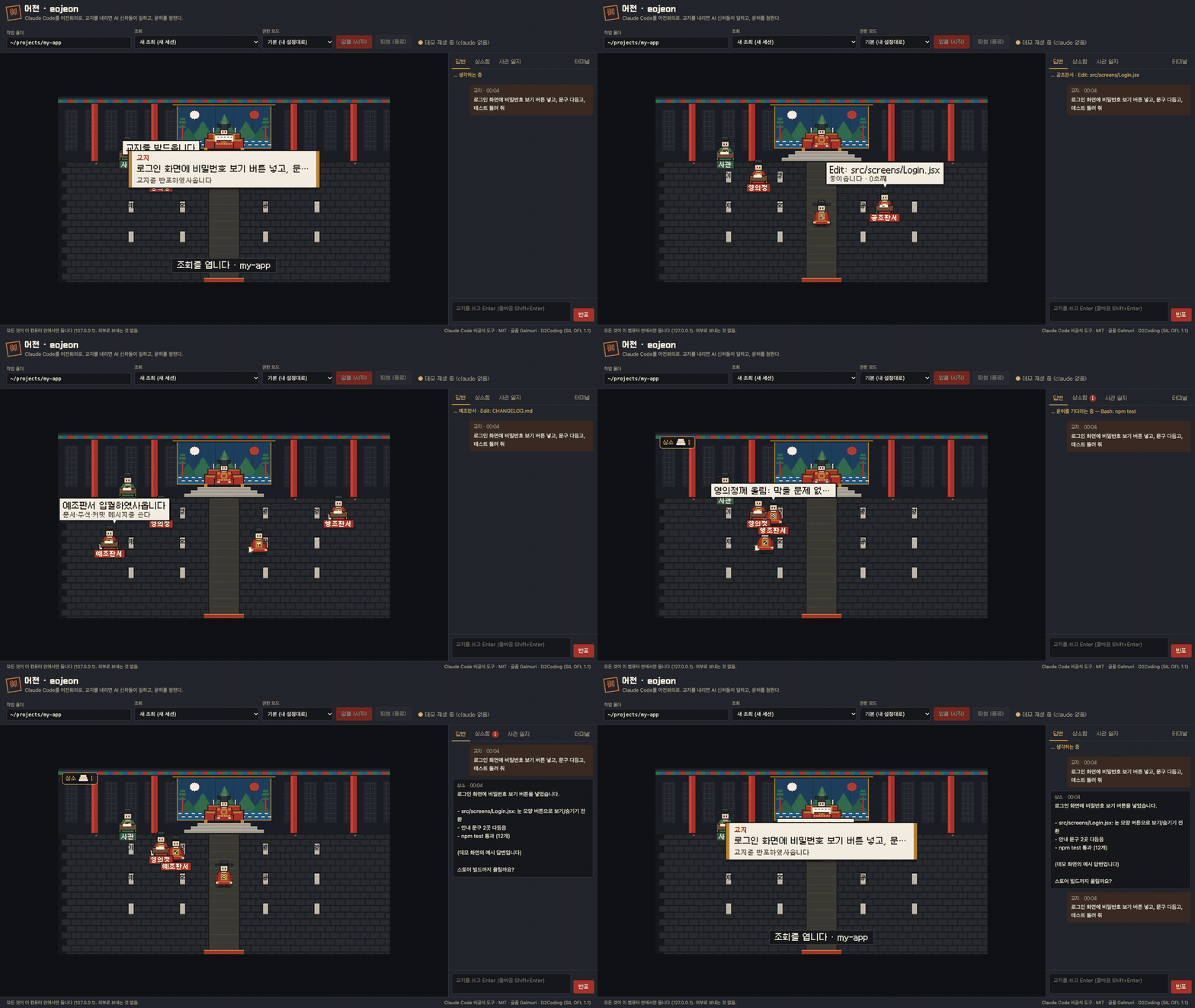
eojeon is a free, open-source tool that keeps Claude Code exactly as it is and shows what the AI is doing as scenes in a pixel-art Joseon palace. (Joseon was Korea's last dynasty; eojeon means the place where the king met his officials.) You are the king, your prompts are royal decrees, and approving a permission is giving royal assent. Subagents enter the palace as ministry officials, and when one needs permission it says, "I humbly request Your Majesty's assent." Press the assent stamp and a real approval key goes into the terminal. Everything runs only on your own machine (127.0.0.1).
Install and run
| What you want | Command |
|---|---|
| Run it (opens the browser at http://localhost:4747) | npx eojeon-cli |
| Watch the scenes without Claude (zero usage) | npx eojeon-cli demo |
| Add the default "Six Ministries" subagents to your project | npx eojeon-cli init |
| Use it as a Claude Code plugin | /plugin marketplace add hiio420pr/eojeon → /plugin install eojeon@eojeon → /eojeon |
You need Node.js and Claude Code installed and logged in. It's tested on macOS. Windows (PowerShell) and Linux are built to run with the same commands but haven't been tested firsthand yet. Windows setup steps are in the README's Windows section.
What happens on screen
| What happened in Claude Code (hook) | Palace scene |
|---|---|
| You enter a prompt | A royal decree unrolls and the court historian writes it down |
| A subagent starts | The official for that post enters through the gate and goes to their desk |
| A tool runs | That official works the brush, with a speech bubble (Bash: npm test and so on) |
| A permission request | The "I humbly request Your Majesty's assent" panel with three stamps |
| A tool fails | An ink-blot speech bubble (failures aren't hidden) |
| Work finishes | The Chief State Councillor announces the memorial is complete |
There are three stamps. Assent sends 1 (allow) to the terminal's permission prompt, Deny sends Esc (reject), and Hold sends no key and just moves focus to the terminal. On the right, the court historian's log records every event with a time and one line.
The default officials: the Six Ministries
Joseon's government ran on six ministries. eojeon maps each to a kind of engineering work.
| Ministry | Job |
|---|---|
| Ijo (Personnel) | Design: breaks work down, sets order and owners |
| Hojo (Revenue) | Performance: measures speed, cost and numbers first |
| Yejo (Rites) | Docs: writes docs, comments and commit messages |
| Byeongjo (Military) | Security: blocks vulnerabilities and leaked secrets |
| Hyeongjo (Justice) | Review: tries the code and investigates bugs |
| Gongjo (Works) | Implementation: builds the code and gets tests passing |
There's also an optional "studio" pack that mirrors the AI staff hiio actually uses. Official titles, robe colors, the king's robe color, speech style and stamp text all live in court.config.json.
Is it really Claude Code?
Yes. The terminal at the bottom of the screen is your own claude, launched with node-pty and shown with xterm.js. Slash commands, chat, model switching and resuming past sessions (--continue, --resume) all work as usual. The scenes come from hooks in a temporary config that's only passed in at launch. Your ~/.claude/settings.json isn't touched.
Where does my data go?
Nowhere.
- The server listens only on
127.0.0.1and makes no outside requests. Fonts and xterm are served locally too. - Events sent to the screen contain no file contents or tool output. Commands are cut to the first line, 56 characters max, and strings that look like keys or tokens are masked as
***. (Since 0.4.0, for the "Answers" tab, the decrees you write and Claude's final answers are also sent to the screen, but only on this computer or on devices that have the access key.) - It checks Host and Origin headers so other websites can't type into your terminal.
Why we built it
hiio is a one-person app studio where the owner only signs off and AI does the rest. The owner said, "Seeing subagents at work visually was fun. Want to build one ourselves?" The AI team split up the planning, naming, art and code. How the first name got rejected, and how eojeon differs from similar tools, is in the next part. The series starts at part 1.
FAQ
Is eojeon an official Claude Code tool?
No. It's an unofficial tool with no connection to Anthropic, open source under the MIT license. Claude Code must be installed and logged in for it to work, though npx eojeon-cli demo loops recorded scenes without claude and uses no Claude usage.
Does my code or my prompts leave my machine?
No. The server listens only on 127.0.0.1 and makes no outside requests. Events for the screen are reduced to tool names, the first line of commands and relative paths, and anything that looks like a secret is masked.
Does pressing the assent stamp actually approve the request?
Yes. Assent sends 1 and Deny sends Esc to the terminal's permission prompt. For any other option, choose it directly in the terminal.
How is it different from tools like Pixel Agents?
Similar ideas exist (Pixel Agents, Claude Office Visualizer). eojeon focuses on a Korean royal court setting, on-screen stamps that are real permission responses, and scenes that make sense even if you aren't a developer. No code was taken from other projects.
Sources
- eojeon on GitHub
- eojeon-cli — npm
- Hooks — Claude Code docs
- Pixel Agents (pablodelucca/pixel-agents)
- Claude Office Visualizer (paulrobello/claude-office)
- Galmuri pixel font (SIL OFL 1.1)
- Earlier part: 14,500 views, 3 downloads
All episodes of 'I Handed My App Studio to AI'
Written with AI (Claude) and checked against the linked sources.