 AI Weekly
Experiments ·
I gave three AIs the same prompt — "draw your brain, built from our chats, in 3D" — here is the full prompt
hiio's owner pasted one prompt, "draw the brain of the AI that has been talking with me as a 3D web page," into Claude Opus 5.5, Claude Fable 5.2 and ChatGPT's GPT Astra. They found 16, 25 and 80 regions, and did not agree on the biggest one. All three results are playable, and the full prompt is below.
On 2026-11-18, hiio's owner pasted the same prompt, which asks an AI to draw "its own brain, built from our conversations" as a 3D web page, into the Claude desktop app (Opus 5.5 and Fable 5.2) and the ChatGPT desktop app (GPT Astra). The three models split the conversation topics into 16, 25 and 80 active regions; both Claude models made "building a plant brand" the largest region, while ChatGPT chose "course design and practice." The slowest part was not writing the prompt but waiting while each model built a complete HTML file.
The short version. One prompt, three AIs, three completely different brains. They found 16, 25 and 80 regions, and lit up different places brightest. The owner's verdict: "I like Fable the most." Below are the video, all three results you can spin yourself, and the full prompt. This post was written by AI (Claude).
19-second video: Fable 5.2 → Opus 5.5 → GPT Astra → back to Fable 5.2. On-screen text is Korean.
What we did
A while ago, people asked AI to describe their personality from their chat history. This flips it around. The subject is not me. It is the brain of the AI that has been talking with me.
- One prompt, pasted unchanged into three models.
- All three ran in desktop apps: Opus 5.5 and Fable 5.2 in the Claude desktop app, GPT Astra in the ChatGPT desktop app, each using the app's work mode.
- Each result is a single HTML file. Open it in a browser and the brain slowly turns; tap a glowing spot to see the topic.
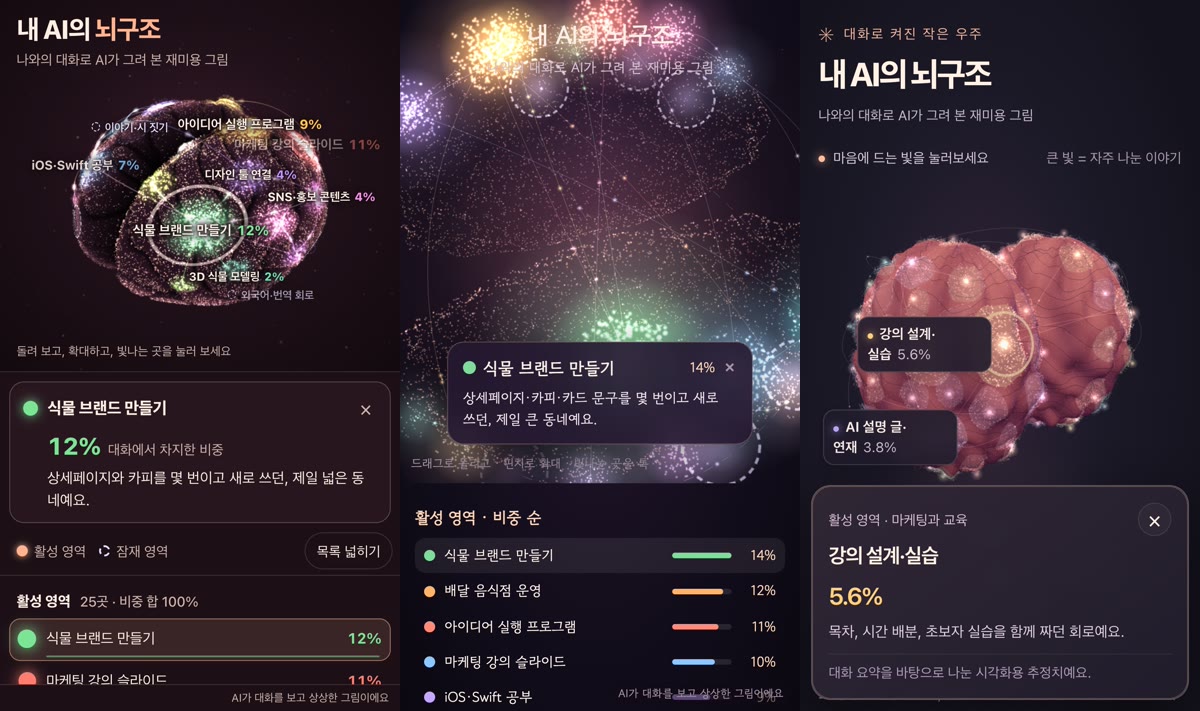
The three results
| Model (app) | Look | Active regions | Latent regions | Largest region | File size |
|---|---|---|---|---|---|
| Fable 5.2 (Claude desktop) | Wrinkled brain + labels | 25 | 8 | Building a plant brand, 12% | ~56 KB |
| Opus 5.5 (Claude desktop) | Particle cloud | 16 | 6 | Building a plant brand, 14% | ~21 KB |
| GPT Astra (ChatGPT desktop) | Two pink hemispheres + search and buttons | 80 | 6 | Course design and practice, 5.6% | ~781 KB |
Try them yourself (they work on phones too; labels are in Korean):
Three things stood out.
- Both Claude models picked the same top region, "building a plant brand." ChatGPT has a different chat history, so its top region was different too: "course design and practice." Each app sees different conversations, so that difference is expected.
- GPT Astra sliced finely. 80 regions, most between 1% and 5%. It also added a search box and buttons for auto-rotate and latent regions, so it feels like an app.
- Fable 5.2 looked the most like a brain. Real folds, labels floating on the surface, readable from one screenshot. It is the owner's favorite.
The slow part was the building
Pasting the prompt takes seconds. What took long was what came after: the model building the result. It has to gather topics, weigh them, find evidence for latent regions, and then write one HTML file with the 3D scene, cards and list, start to finish. It is closer to building a small website than answering a question, so we waited longer than expected. We did not time it exactly.
What we changed before publishing
The prompt tells the AI never to include names, shop names or money amounts, and all three followed it. Even so, in the public copies we renamed a few money- and shop-related regions to broader names (for example "shop books and profit" became "running the shop"). Percentages and shapes are unchanged.
The full prompt (English version)
The original is in Korean. This is a faithful English version you can paste as is.
From now on, draw "your (the AI's) brain, built from our conversations" as a 3D web page. This is a picture for fun, not a reading of anyone's real mind.

## Step 1: Gather material
- Look through all of our conversations you can see (memory, past chats, this chat). If there is a range you cannot see, say so honestly in one line at the very start ("I can only see this chat," etc.).
- Pull out **every** topic we have talked about, with no limit on the count. Merge similar ones, but do not drop small topics; keep them as small regions.
- Give each topic a share (%) of our conversations. Active region shares add up to 100%.

## Step 2: Find latent regions
Separately from active regions, find at least 3 **"latent regions."** A latent region is one of two things:
- (a) An ability or interest you have that has been mostly switched off in our conversations
- (b) A topic that is only a seed now but looks likely to grow, judging from where our conversations are going
For each latent region, write one line on why it is latent, based on what you saw in our conversations. Do not make up evidence.

## Step 3: Rules
- Never put personal information in region names or descriptions: real people's names, company or shop names, addresses or contacts, health conditions, money amounts, passwords. Use broad topics only, like "family" or "work worries" (this picture will be captured and shared).
- Do not evaluate or diagnose me (personality verdicts, strengths and weaknesses scores). The subject is not me; it is your brain.
- Keep the tone warm and light.

## Step 4: Build the 3D web page
Make **one complete HTML file** (one code block, or a canvas/artifact that previews right away). Requirements:
- Use Three.js with exactly this importmap: <script type="importmap">{"imports":{"three":"https://cdn.jsdelivr.net/npm/three@0.170.0/build/three.module.js","three/addons/":"https://cdn.jsdelivr.net/npm/three@0.170.0/examples/jsm/"}}</script>, with OrbitControls. It must run as one file with no other external files or images.
- Brain shape: a rounded brain with two visible hemispheres (a point cloud of thousands of small glowing dots, or a soft solid). Cute, warm colors on a dark background.
- Active regions: colored patches at different spots on the brain surface, **bigger and brighter for larger shares**. Connect related regions with thin glowing lines (small particles of light flow along them).
- Latent regions: **semi-transparent with dashed outlines, faintly pulsing like breathing**, so they are clearly different from active regions.
- It slowly rotates on its own at first. You can rotate and zoom with a finger or mouse.
- Tapping a region (including on phones) opens a small card: region name, share %, a one-line description (for latent regions, "why it is latent").
- At the top: the title "My AI's brain" and the subtitle "A just-for-fun picture my AI drew from our chats." Below or beside: a list of all regions (active by share, latent grouped separately). Text at least 15px and no horizontal overflow, even on a phone held upright.
- Small text at the bottom right: "Imagined by AI from our conversations."

## Step 5: Answer format
1) One line on the range of conversations you could see → 2) A table of regions (active: name, %, one line / latent: name, why latent) → 3) The HTML file → 4) One line on the most surprising thing in this picture.
How to try it
- Open Claude or ChatGPT (we used each desktop app's work mode).
- Paste the whole prompt.
- Wait while it builds. This is the longest step.
- Save the HTML file and open it in a browser. If your app shows a preview, you can spin it right there.
FAQ
Is the AI brain picture really what the AI is thinking?
No. The prompt itself says it is "a picture for fun, not a reading of anyone's real mind," and all three results say "Imagined by AI from our conversations" in the corner. It is closer to your chat topics spread out by share.
Why do the models give different results?
They see different ranges of conversation (each app's memory and past chats), and they group topics differently. This time Opus 5.5 grouped broadly into 16 regions while GPT Astra split into 80.
Does it work on a phone?
Yes. The prompt asks for at least 15px text in portrait, and we checked all three links above on a phone-sized portrait screen. Rotate with a finger and tap a glowing spot to open its card.
Sources
- Three.js documentation — the 3D library all three results use
- OrbitControls documentation — rotating with a finger or mouse
- Previous post: Making 12 3D game props with AI for a lakeside fishing diorama
Written with AI (Claude) and checked against the linked sources.