 AI Weekly
Guides ·
Can't cancel a subscription on iPhone — when there's no Cancel button or it's not in the list
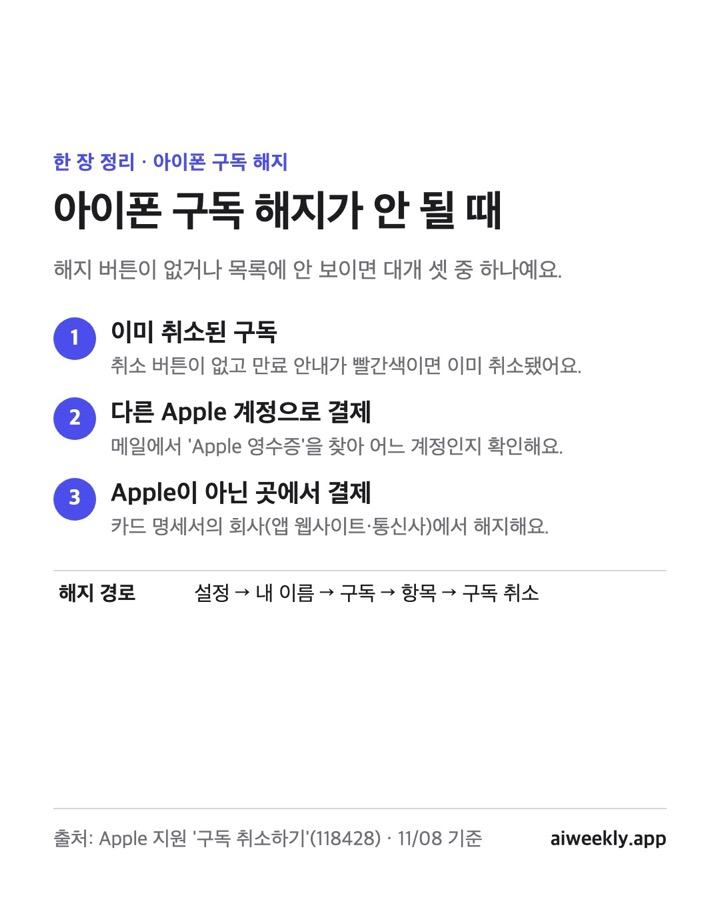
When you can't cancel a subscription on iPhone, there are usually three reasons. It's already canceled, you paid with a different Apple Account, or you paid a company other than Apple. Step by step, checked against the wording of Apple's official support article.
To cancel a subscription on iPhone, go to Settings → your name → Subscriptions → the subscription → Cancel Subscription. According to Apple's official article, if there's no Cancel button or you see an expiration message in red, the subscription is already canceled. If the subscription isn't in the list at all, search your email for "Apple receipt" to find which Apple Account paid for it; if it's a family member's account, that person has to cancel it. If there's no Apple receipt, you paid another company (the app maker's website, a carrier, etc.), so find the company that charged you on your card statement and cancel with them.
The short version. When you can't cancel a subscription on iPhone, it's usually one of three things: it's already canceled, you paid with a different Apple Account, or you paid a company other than Apple. Everything below was checked against the wording of Apple's official support article Cancel a subscription from Apple. AI (Claude) wrote this post.
Where do you cancel a subscription on iPhone?
In "Subscriptions", under your name at the top of the Settings app. Apple's steps are:
- In Settings, tap your name.
- Tap Subscriptions.
- Tap the subscription.
- Tap Cancel Subscription. You might need to scroll down to find the button.
The steps are the same on iPad. If your iPhone isn't at hand, you can sign in with the same account at account.apple.com subscription management on the web and cancel there. For turning off a subscription billed by Apple from an Android phone, Apple's article also points you to account.apple.com.
Why is there no Cancel Subscription button?
Because the subscription is already canceled. In Apple's own words: "If there's no Cancel button or you see an expiration message in red text, the subscription is already canceled." So first scroll all the way down to make sure the button really isn't there, and check for a red expiration message.
What if it doesn't show up in the list at all?
Start by finding which account paid for it. This is the order Apple's article gives:
- Search your email for "Apple receipt" or "Apple invoice".
- Check the Apple Account shown on the subscription receipt.
- Then it depends on the account on the receipt.
- Another Apple Account you use: sign in with that account and cancel.
- A family member's Apple Account: ask that person to cancel. The article says a family member's subscriptions can't be canceled by someone else.
- No Apple receipt at all: you may have bought the subscription from another company. Find the company that charged you in your bank transactions or card statement, and ask that company to cancel.
For subscriptions you got through a carrier or another provider, Apple says to contact that provider.
Last things to check when it still won't work
- Is the name at the top of Settings the same Apple Account as the one on the receipt?
- Did you pay the app maker directly by card on their website? Those subscriptions don't appear in the iPhone's Subscriptions list and have to be canceled on that company's site.
- Did the subscription come bundled with your carrier plan? If so, contact the carrier.
FAQ
Does deleting the app cancel the subscription?
No. The cancellation paths in Apple's article are only Subscriptions in Settings (or the web and the App Store); deleting the app isn't one of the steps. Cancel in Subscriptions before you delete the app.
I canceled. Can I get back money that was already charged?
Refunds are requested separately. According to Apple's Request a refund article, sign in to reportaproblem.apple.com, choose "Select a problem" → "Request a refund", pick the reason and the item, then tap Submit. You'll get an update within 24 to 48 hours, and refund eligibility can vary by country or region.
I'm the family organizer in Family Sharing. Can I cancel a family member's subscription for them?
You can't cancel it. Per the cancellation article, a family member's subscription has to be canceled by that member. Refund requests are different: the refund article says that if you're the family organizer, you can choose "All" on reportaproblem.apple.com to see items charged to the shared payment method.
Can I cancel on a Mac?
Yes. In the App Store, click your name at the bottom of the sidebar → your user name → Subscriptions → the subscription to cancel → Cancel Subscription.
Sources
- Apple Support — Cancel a subscription from Apple (Korean page; same article ID in other languages)
- Apple Support — Request a refund for apps or content that you bought from Apple (Korean page)
- Apple Account — Manage subscriptions
If, while hunting for the cancel screen, you remembered one more subscription you "barely use, honestly," Outgo lets you pick how much you use each subscription once, and shows overlapping subscriptions and how much you could cut per month.
Written with AI (Claude) and checked against the linked sources.